Resolved Same issue: 3 Beeps x5...

Resolved
   #1  

HodgesJaso

Verified VCDS User
Verified
Joined
Oct 19, 2026
Messages
8
Reaction score
11
Location
USA
VCDS Serial number
C?ID=671829
Having the same issue as quoted below in two different threads. Tried on three separate PCs.

Additionally, I cannot connect to any Wifi networks. Help!?
When I plug my hexnet in to the car ODB port or my PC via USB I get 3 beeps x 5 . Tried firmware update but just get USB error after the laptop has downloaded it.

Exactly the same as this thread except that mine does not beep at all if you do a factory reset.


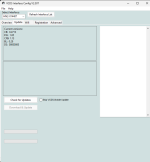
Screenshot 2026-10-25 140110.png


I also tried

Yes there is a way to rebuild the SD card, it goes something like this:
SD card you want in interface, interface connected via USB, advanced tab in VCIConfig
Feat. code:0701020304
[Check Feat. Update]
Once successful, unplug and replug to powercycle interface
In VCIConfig Updates tab
[Check for Updates]
Make sure Skip VCDS-Mobile update is not checked
[Download & Update]

This should force redownload everything to the SD card.

But no change.
 
Last edited:
   #2  

Dana

Administrator
Staff member
Administrator
Ross-Tech Employee
Joined
Jan 29, 2014
Messages
7,110
Reaction score
11,057
Location
Western PA, USA
Thanks for the detailed information. It sounds like the SD card has failed however in order to verify the base functions are OK I would open the interface up and remove the SD card entirely. Then, plug it back in to your PC via USB and check for updates. If the CFB, CB or FW levels still show zeros tick the Skip VCDS-Mobile Update box and then Download and Update.

When you get to the point where real CFB, CB and FW value are showing in VCIConfig and the USB error is gone please reassemble the interface and test it on a car via USB using VCDS.

Providing it works correctly on a vehicle we can move forward with SD card replacement. It will only work via USB (no WiFi) and it will continue to think a DS update is needed in the interim.
 
   #3  

HodgesJaso

Verified VCDS User
Verified
Joined
Oct 19, 2026
Messages
8
Reaction score
11
Location
USA
VCDS Serial number
C?ID=671829
Thanks for the detailed information. It sounds like the SD card has failed however in order to verify the base functions are OK I would open the interface up and remove the SD card entirely. Then, plug it back in to your PC via USB and check for updates. If the CFB, CB or FW levels still show zeros tick the Skip VCDS-Mobile Update box and then Download and Update.

When you get to the point where real CFB, CB and FW value are showing in VCIConfig and the USB error is gone please reassemble the interface and test it on a car via USB using VCDS.

Providing it works correctly on a vehicle we can move forward with SD card replacement. It will only work via USB (no WiFi) and it will continue to think a DS update is needed in the interim.

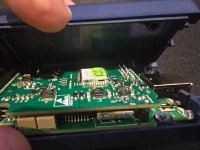
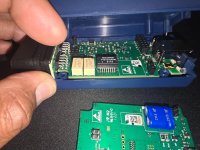
I opened it and do not see an SD card at all. I see two boards, one plugs into the other and can be removed, but there does not appear to be the type of "SD Card" for which I am familiar.
 

Attachments

  • 20261026_132404.jpg
    20261026_132404.jpg
    251.5 KB · Views: 13
  • 20261026_132438.jpg
    20261026_132438.jpg
    345.8 KB · Views: 13
   #4  

TTT

Verified VCDS User
Verified
Joined
Jun 10, 2023
Messages
2,513
Reaction score
1,254
Location
Netherlands
VCDS Serial number
C?ID=547002
It is at the back of the PCB, take it out.
 
   #5  

HodgesJaso

Verified VCDS User
Verified
Joined
Oct 19, 2026
Messages
8
Reaction score
11
Location
USA
VCDS Serial number
C?ID=671829
It is at the back of the PCB, take it out.
Appreciate the advice! Waiting for an Ross-Tech Employee to make that request before I attempt.
 
   #6  

TTT

Verified VCDS User
Verified
Joined
Jun 10, 2023
Messages
2,513
Reaction score
1,254
Location
Netherlands
VCDS Serial number
C?ID=547002
What do you mean? You need less than 2Nm to raise that pcb further. Photo 2. Pull from OBD connector up, and slide, to get the LEDs out nicely.
 
   #7  

HodgesJaso

Verified VCDS User
Verified
Joined
Oct 19, 2026
Messages
8
Reaction score
11
Location
USA
VCDS Serial number
C?ID=671829
What do you mean? You need less than 2Nm to raise that pcb further. Photo 2. Pull from OBD connector up, and slide, to get the LEDs out nicely.

It didn't move that easily when I attempted, I didn't want to wrestle with it unless directed.

I manipulated it a bit and managed to locate the SD card.
 
Last edited:
   #8  

Shaun

Active Member
Ross-Tech Employee
Joined
Jan 29, 2014
Messages
2,071
Reaction score
3,366
Location
USA
As others have said, just lift the board from the DLC connector side and wiggle it forward a little it should come right out. Then you should see the SD card.
To put it back into the case do the reverse, make sure the button is aligned with the hole and slide it back in.
 
   #9  

HodgesJaso

Verified VCDS User
Verified
Joined
Oct 19, 2026
Messages
8
Reaction score
11
Location
USA
VCDS Serial number
C?ID=671829
Thanks for the detailed information. It sounds like the SD card has failed however in order to verify the base functions are OK I would open the interface up and remove the SD card entirely. Then, plug it back in to your PC via USB and check for updates. If the CFB, CB or FW levels still show zeros tick the Skip VCDS-Mobile Update box and then Download and Update.

When you get to the point where real CFB, CB and FW value are showing in VCIConfig and the USB error is gone please reassemble the interface and test it on a car via USB using VCDS.

Providing it works correctly on a vehicle we can move forward with SD card replacement. It will only work via USB (no WiFi) and it will continue to think a DS update is needed in the interim.

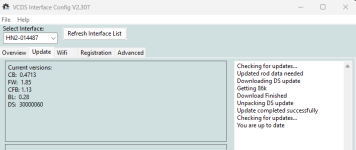
  • Beeping is gone.
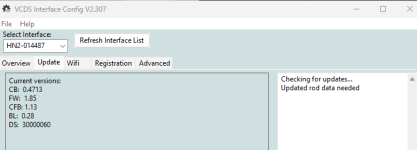
  • Real CFB, CB and FW value are showing in VCIConfig. (image below)
  • No USB errors
  • Reassembled the interface and tested it on a car via USB using VCDS
    • SUCCESS

Looks like I meet the criteria for an SD card replacement.
 

Attachments

  • Screenshot 2026-10-26 143056.png
    Screenshot 2026-10-26 143056.png
    21 KB · Views: 6
   #10  

Shaun

Active Member
Ross-Tech Employee
Joined
Jan 29, 2014
Messages
2,071
Reaction score
3,366
Location
USA
Ok please try re-inserting the SD card and check for updates again, see if it will update the SD card now.
 
   #11  

HodgesJaso

Verified VCDS User
Verified
Joined
Oct 19, 2026
Messages
8
Reaction score
11
Location
USA
VCDS Serial number
C?ID=671829
Ok please try re-inserting the SD card and check for updates again, see if it will update the SD card now.


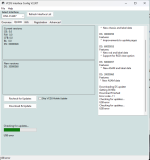
Initial screen:

View attachment 7616

Updates finished:

1793041883795.png

After restart it says I am up to date!!!

And even the WIFI connections are working now!!!

Looks like "Problem Solved," ya?
 

Attachments

  • Screenshot 2026-10-26 150819.png
    Screenshot 2026-10-26 150819.png
    15.1 KB · Views: 3
   #12  

Dana

Administrator
Staff member
Administrator
Ross-Tech Employee
Joined
Jan 29, 2014
Messages
7,110
Reaction score
11,057
Location
Western PA, USA
Thanks for the update!

If this happens again we can decide if making arrangements to get you one of our SD cards versus sourcing one yourself (followed by some additional steps) makes the most sense. 2026 has been a wild year so "cheap" flash memory doesn't exist but something like this card should be OK providing that says near $12 USD rather than unobtainable in future or ridiculous price.
 
  • Like
Reactions: Uwe
   #13  

HodgesJaso

Verified VCDS User
Verified
Joined
Oct 19, 2026
Messages
8
Reaction score
11
Location
USA
VCDS Serial number
C?ID=671829
100%

Thanks for the update!

If this happens again we can decide if making arrangements to get you one of our SD cards versus sourcing one yourself (followed by some additional steps) makes the most sense. 2026 has been a wild year so "cheap" flash memory doesn't exist but something like this card should be OK providing that says near $12 USD rather than unobtainable in future or ridiculous price.
 
   #14  

Dana

Administrator
Staff member
Administrator
Ross-Tech Employee
Joined
Jan 29, 2014
Messages
7,110
Reaction score
11,057
Location
Western PA, USA
One final comment. Everything is fine in our records but in order to get your details to appear on the About screen of VCDS you'll need to enter the Transaction ID that was emailed (10/24/2026 7:56 PM Eastern) into the Reg Tab of VCIConfig. That might have gave you a hard time before when the interface was unhappy but it should go smoothly now.
 
  • Like
Reactions: Uwe
   #15  

HodgesJaso

Verified VCDS User
Verified
Joined
Oct 19, 2026
Messages
8
Reaction score
11
Location
USA
VCDS Serial number
C?ID=671829
Done, and Done.

I cannot than you great folks enough for the assistance. Everything is working nicely and you have my highest appreciation.

You as well, @TTT !
 
Back
Top