
Is it possible to re-image/rebuild internal SD card of HEX-NET?

   #1  

nabeelr

Verified VCDS User
Verified
Joined
Jun 4, 2021
Messages
75
Reaction score
22
Location
Ottawa, Canada
VCDS Serial number
C?ID=395028
Long story short, I've recently had a lot of flash memory fail just due to time and not due to use.

This has me going through all my devices that have SD cards / flash memory and backing them up when I can.

I popped out the SD card of my HEX-NET to back it up, and noticed the file system thinks it's larger than the SD card itself actually is.

I backed up everything, formatted the SD card using the SD card Associations approved formatting utility (which also does things like mark bad blocks and do garbage collection on SD cards), and copied everything back.

After a factory reset, all seems good… but I can't shake the feeling, since the file system on the SD card WAS indeed corrupted (even thought the SD card was physically fine with no bad blocks, and my HEX-NET was working totally fine), there may be corruption of the data that I pull off of it and restored.

I noticed wiping the SD card and just popping it back in blank, some file can get rebuilt with the VCIConfig tool, but VCDS-mobile does not.

Is there a way to actually properly rebuild the SD card, or are my only options buying a new SD card or using what I pulled off and hoping it was a clean copy?
 
   #2  

Shaun

Active Member
Ross-Tech Employee
Joined
Jan 29, 2014
Messages
2,071
Reaction score
3,366
Location
USA
Yes there is a way to rebuild the SD card, it goes something like this:
SD card you want in interface, interface connected via USB, advanced tab in VCIConfig
Feat. code:0701020304
[Check Feat. Update]
Once successful, unplug and replug to powercycle interface
In VCIConfig Updates tab
[Check for Updates]
Make sure Skip VCDS-Mobile update is not checked
[Download & Update]

This should force redownload everything to the SD card.
 
   #3  

nabeelr

Verified VCDS User
Verified
Joined
Jun 4, 2021
Messages
75
Reaction score
22
Location
Ottawa, Canada
VCDS Serial number
C?ID=395028
Thanks for the reply Shaun!


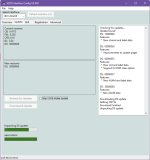
Hmm, I'm only getting a couple of the shtml files in the /fs/ folder for VCDS mobile, and VCIConfig throws this message saying "null device error" (screen shot attached below) on the bottom bar near the end when it's copying some the shtml files to the SD card. Connecting to VCDS Mobile renders the text "Could not find the page you were looking for. Copyright (c) HEX Microsystems (Pty) Ltd. 2013"

It also seems that I can't save any settings for Wi-Fi either, and the CPU LED occasionally blinks orange as well as green, or starts blinking orange and red.

The image I pulled from the SD card before I did all this to it had a lot more files in the /fs/ folder, as well as a folder that looked like image resources for VCDS Mobile.


This is where I got stuck when I first tried this before creating this forum post. I've also tried this step with the factory reset using the red button, without success.

The only way I got it fully working, is by copying over the old (possibly questionable) data from image of the corrupt file system of the SD card from before I re-formatted it, then following those factory reset steps to clear the "SD Critical Error" message in VCDS Mobile. But as far as getting it working without reusing the old data from the corrupt copy of the SD card, no luck.

Is something wrong that I'm not getting a fully copy of VCDS mobile, or am I doing something wrong?

Is this indicative of a larger issue?

Originally, before I posted here, I was thinking that perhaps Ross-Tech is reluctant to distribute the all the VCDS mobile files, perhaps because of licensing issues (which I'd understand), but from your message it sounds like it should be possible to rebuild the whole SD card from a fresh format, including VCDS-Mobile, right?


I'm ok just restoring all the files from that backup and doing this restore using the feature code and the factory reset steps if that's the right thing to do, but if I could get a fresh copy of everything, that would really put my mind at ease.


1787190839450.png
 
Last edited:
   #4  

Shaun

Active Member
Ross-Tech Employee
Joined
Jan 29, 2014
Messages
2,071
Reaction score
3,366
Location
USA
It should be possible to restore, I think this issue might have been server side.
Please try again with the instructions I posted.
 
   #5  

nabeelr

Verified VCDS User
Verified
Joined
Jun 4, 2021
Messages
75
Reaction score
22
Location
Ottawa, Canada
VCDS Serial number
C?ID=395028
It should be possible to restore, I think this issue might have been server side.
Please try again with the instructions I posted.
Thanks Shaun!

I see it pulling all the files now!

But, I stumbled across a couple problems that I was able to fix, and I thought you guys might want to know about them:

1st, after the update, the password didn't work for VCDS mobile (the default password or my own password), even after doing a 45 second factory reset, but I did the 10+ second password reset and that fixed it.

2nd, Wifi profiles didn't work at all, and I had to manually create the "profiles" and "profiles-2" file in the SD card with generic blank data in it like this to get Wi-Fi to work again:
Code:
profile:1
priority:1
ssid:Not Configured
mode:0
ip_mode:1
enc:0
hostname:hexnet

profile:2
priority:2
ssid:Not Configured
mode:0
ip_mode:1
enc:0
hostname:hexnet

profile:3
priority:3
ssid:Not Configured
mode:0
ip_mode:1
enc:0
hostname:hexnet

profile:4
priority:4
ssid:Not Configured
mode:0
ip_mode:1
enc:0
hostname:hexnet

profile:5
priority:5
ssid:Not Configured
mode:0
ip_mode:1
enc:0
hostname:hexnet

profile:6
priority:6
ssid:Not Configured
mode:0
ip_mode:1
enc:0
hostname:hexnet

profile:7
priority:7
ssid:Not Configured
mode:0
ip_mode:1
enc:0
hostname:hexnet

profile:8
priority:8
ssid:Not Configured
mode:0
ip_mode:1
enc:0
hostname:hexnet

But after doing those two things, everything seems to be working as it should now!

Thanks so much for your help, I really appreciate it!

Also, I just realized…

1787203965203.png

^^ this is probably you, hahaha.

Thanks again, Shaun!
 
Last edited:
  • Like
Reactions: Uwe
Back
Top
